Team mode
Team mode — two more tickets, one PR, one merge into main
Chapter 1 left one change on lingtai-base and its ticket open. This chapter
finishes the day on the same Chapter Garden project, in the same home: two more
tickets land, you submit them as one PR, and you merge it into main.
Why team#
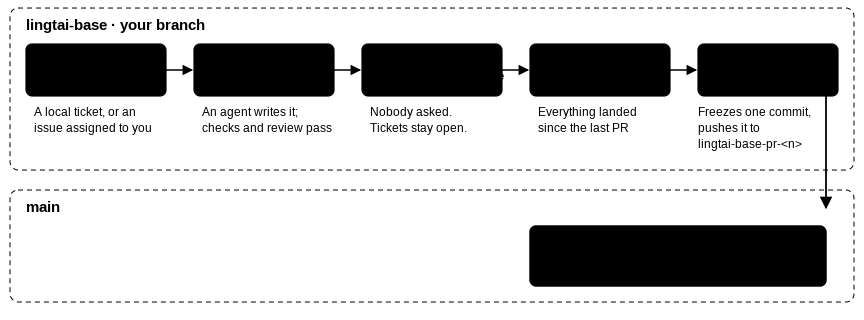
Your tickets land on your own branch, lingtai-base, and main moves only
through a PR you chose to submit. Nobody has to watch each landing, and one bad
ticket is one git revert in the PR rather than a hole in main. A team
project is the default for every new project, even for one person, because the
review you would want from a colleague is the review of one PR, and the
history stays readable: one merge commit per PR.
Open the diagram at full size.
Two more tickets#
Pick two other stories from the bookshelf, one for each ticket, so the two changes touch different files. Run each once: another run is another ticket and another paid attempt, a writer and a reviewer.
lingtai ticket new --title "Add the next chapter to <first story>" --label feature \
  --body "Find the latest chapter of this story and write one new chapter that continues it. Follow the story's existing language, chapter numbering, and Markdown layout. Keep earlier chapters unchanged."
lingtai ticket new --title "Add the next chapter to <second story>" --label feature \
  --body "Find the latest chapter of this story and write one new chapter that continues it. Follow the story's existing language, chapter numbering, and Markdown layout. Keep earlier chapters unchanged."
Keep lingtai start running and watch lingtai board until both cards are
Landed. If two tickets do change the same file, an agent resolves the
conflict; chapter 7 has the details.
The draft#
lingtai pr
draft: 3 ticket(s) landed on lingtai-base
The draft is the project's next PR, not yet submitted. It holds the tickets
landed on lingtai-base since the last PR was frozen, here all three.
Submit#
lingtai pr submit
This needs a running conductor, so leave lingtai start up. It freezes
lingtai-base at one commit, pushes that commit to a branch of its own and
runs the build. It also buys one more paid agent run, which writes the PR's
title and summary. With nothing landed, or with a PR already open, it refuses
and says why. A refused submit returns the PR to the draft.
Submit returns once the PR is frozen; the build, the summary and the push come
after, in the running conductor. If lingtai start is not running, the request
is kept and waits there: start it and it is served. Do not submit again, since a
second submit is refused while the first is open. Run lingtai pr until the PR
leaves in-progress. The board shows the same PR as one of five states: Draft,
In progress, Waiting on you, In review, Merged.
PR <n>: in-review — lingtai-base-pr-<n>
<n> is the PR's number, which lingtai pr prints. Your checkout is the
remote, so the branch is pushed into it and no pull request is opened anywhere.
Only once the PR is In review is the branch there, and the description lingtai pr prints under that line is there to read. You review the PR as a diff:
git -C chapter-garden diff main...lingtai-base-pr-<n>
Merge it#
Merge the PR's branch, not lingtai-base, which may already hold landings that
belong to the next draft. Do it on main, with a merge commit:
git -C chapter-garden switch main
git -C chapter-garden merge --no-ff lingtai-base-pr-<n>
There is no git push, because your checkout's main is the remote's main.
Stay on main afterwards: Lingtai then merges main back into lingtai-base,
and a push into a branch you have checked out is refused.
Never squash. Lingtai marks a PR Merged when the PR's last pushed commit is an
ancestor of main, and a squash commit does not contain it, so the PR would
stay In review for good. Keep lingtai start running for this step too: the
running conductor notices the merge on a later sweep, not at the moment of the
merge, so the PR may still read in-review and the tickets stay open for a
little while. Run lingtai pr again until it reports the merge.
lingtai pr
PR <n>: merged by git at 2026-11-24T10:00:00.000Z
That line means the PR is Merged, not yet that its tickets are closed. The
conductor records the merge, closes the PR's three tickets, the first one from
chapter 1 included, and catches lingtai-base up with main, but these are
separate jobs that finish independently, in no promised order. A line saying
lingtai-base has caught up with main does not show the tickets are closed.
Ask for the tickets themselves:
lingtai ticket list
The PR's three tickets are closed once none of them is listed; if one still is, run it again after a moment. Each new ticket from here is one more paid attempt, and each submit one more paid summary, so the cost follows the tickets you open. The next ticket starts the next draft.
Next#
Next: Connect GitHub — the same day on a shared remote.
Rendered from doc/team.md at build time. The file is the document; this page is a projection of it, and never a copy — which is why the fix for anything wrong on it is a pull request against that file.